

Canva Embed
Show a Canva presentation on your screens, and update it from Canva.
Updated 1 min read
On this page
The Canva Embed app plays a Canva presentation slide by slide. Edit the design in Canva and the screen picks up your changes, so your team can keep designing where they already work. You'll need the design's Smart embed link from Canva.
Get the link from Canva
- Open your design in Canva.
- Click Share at the top right.
- Copy the Smart embed link.
Note: Canva renames its share menu from time to time, so the labels may differ slightly.
Set it up
- Turn on Canva Embed in Apps → App Store (only once).
- Go to Apps → My Apps → Canva Embed and click Create Instance.
- Paste the link and fill in the settings below, check the live preview, and save.
- In My Apps, open the menu next to Preview on its row and click Add to playlist or Set to Screen. You can also add it from the playlist, with Add content (on its Apps tab).
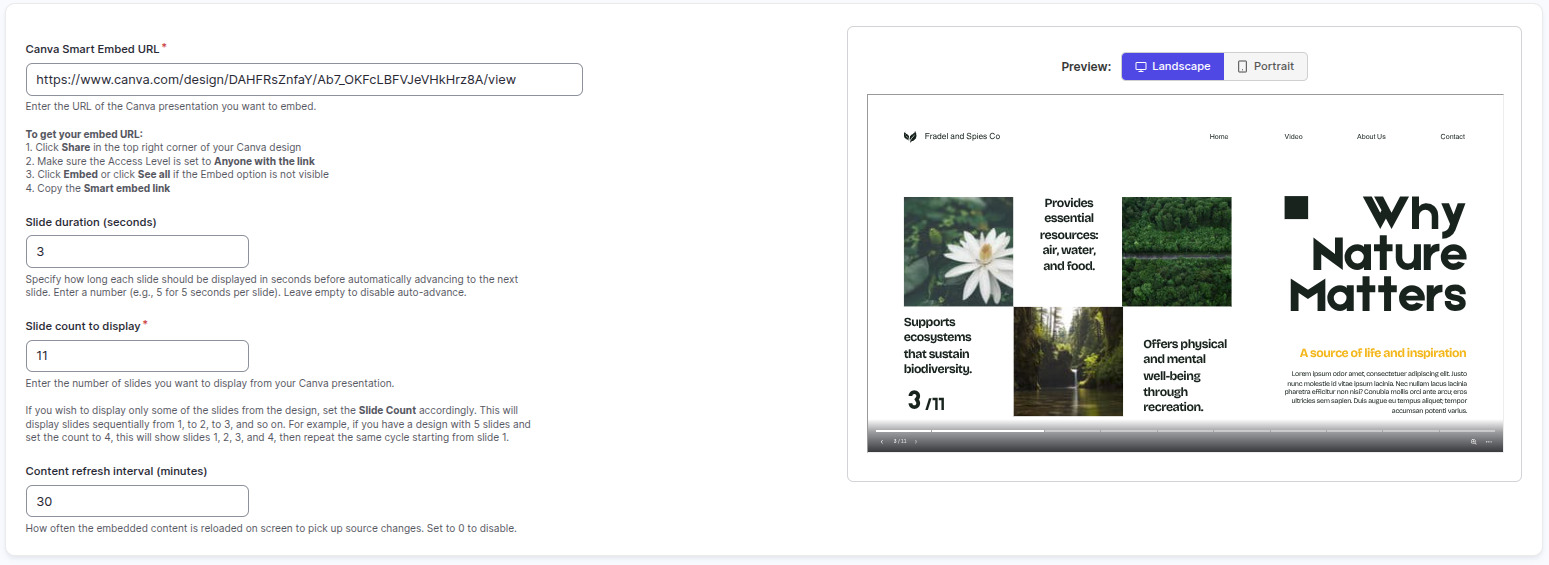
Settings
| Setting | What it does |
|---|---|
| Name | Your name for this app in Screen Pulse. |
| Canva Smart Embed URL | The Smart embed link from Canva. |
| Slide duration (seconds) | How long each slide shows. |
| Slide count to display | How many slides to play, from the first. |
| Content refresh interval (minutes) | How often to check Canva for changes. 0 means never. |
Tips
- Design at screen size: 1920 × 1080 for landscape screens, 1080 × 1920 for portrait.
- In a playlist, set the item's duration to slide duration × slide count, so every slide gets its turn.
- Want changes to appear quickly? Set a refresh interval, such as 15 minutes.
- A closer Canva connection, such as picking designs from your Canva account inside Screen Pulse, is on our roadmap. Until then, use the Smart embed link, or export designs as images.
Related articles
Still need help?
Our support team can walk you through it.