

HTML Embed
Show your own HTML, such as a widget snippet from another service.
Updated 1 min read
The HTML Embed app shows HTML code you paste in, up to 10,000 characters. Use it for embed snippets from other services (a weather widget, a ticker) or a small custom design made by your web team.
Set it up
- Turn on HTML Embed in Apps → App Store (only once).
- Go to Apps → My Apps → HTML Embed and click Create Instance.
- Paste your code and fill in the settings below, check the live preview, and save.
- In My Apps, open the menu next to Preview on its row and click Add to playlist or Set to Screen. You can also add it from the playlist, with Add content (on its Apps tab).
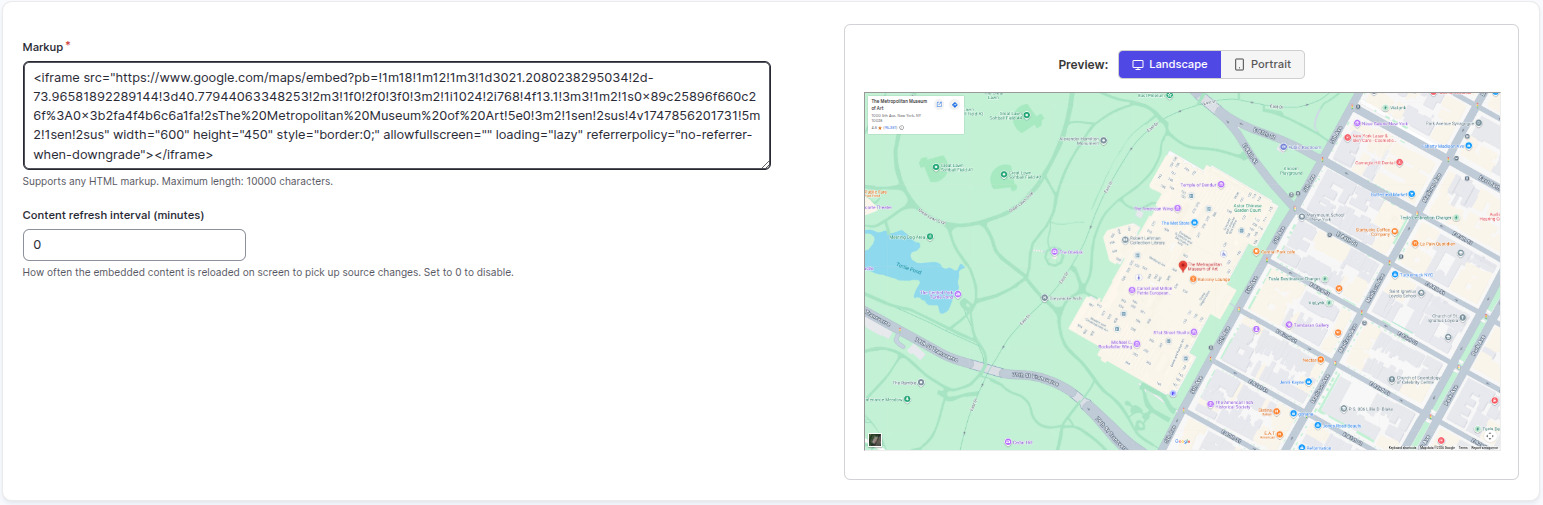
Settings
| Setting | What it does |
|---|---|
| Name | Your name for this app in Screen Pulse. |
| Markup | The HTML to show. Up to 10,000 characters. |
| Content refresh interval (minutes) | How often to reload, so live widgets stay current. 0 means never. |
Tips
- If you just have a link, use Webpage Embed instead.
- Snippets that need a login, or check which site they're on, may not show on a screen.
Related articles
Still need help?
Our support team can walk you through it.