

Quote
Show a quotation with its author, on its own or with an image.
Updated 1 min read
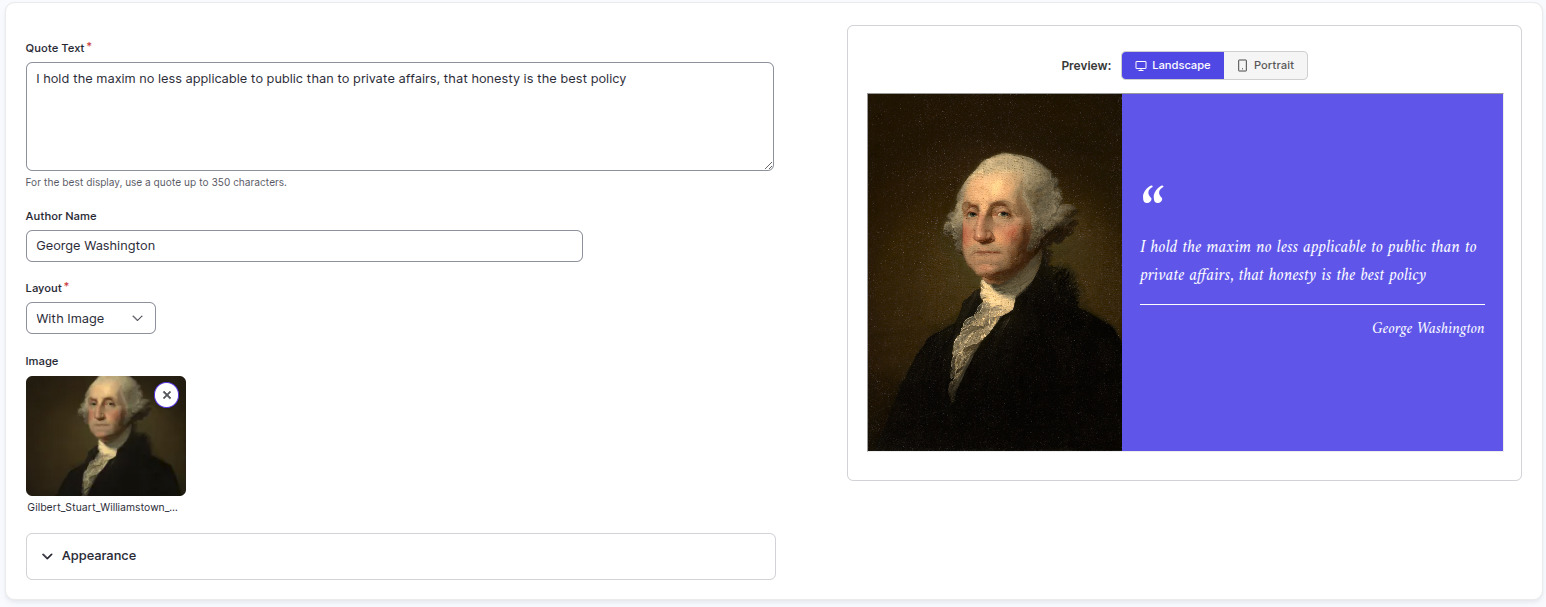
The Quote app shows a quotation and its author in your colors, with or without an image. Use it for an inspirational quote, a member testimonial or a word from your director.
Set it up
- Turn on Quote in Apps → App Store (only once).
- Go to Apps → My Apps → Quote and click Create Instance.
- Fill in the settings below, check the live preview, and save.
- In My Apps, open the menu next to Preview on its row and click Add to playlist or Set to Screen. You can also add it from the playlist, with Add content (on its Apps tab).
Settings
| Setting | What it does |
|---|---|
| Name | Your name for this app in Screen Pulse. |
| Quote Text | The quotation. Keep it under about 350 characters. |
| Author Name | Who said it. |
| Layout | Without Image or With Image. |
| Image | The image to show, when the layout includes one. |
| Text Color | Color of the quote and author. |
| Background Color | The background. |
| Accent Color | Color of the quotation marks and the divider line. |
Tips
- Shorter quotes read better. One or two sentences is ideal on a screen.
- Set up one copy per quote and put them in a playlist to rotate through several.
Related articles
Still need help?
Our support team can walk you through it.