

Play videos with sound
When videos play muted, when they play with sound, and how to change it.
Updated 1 min read
On this page
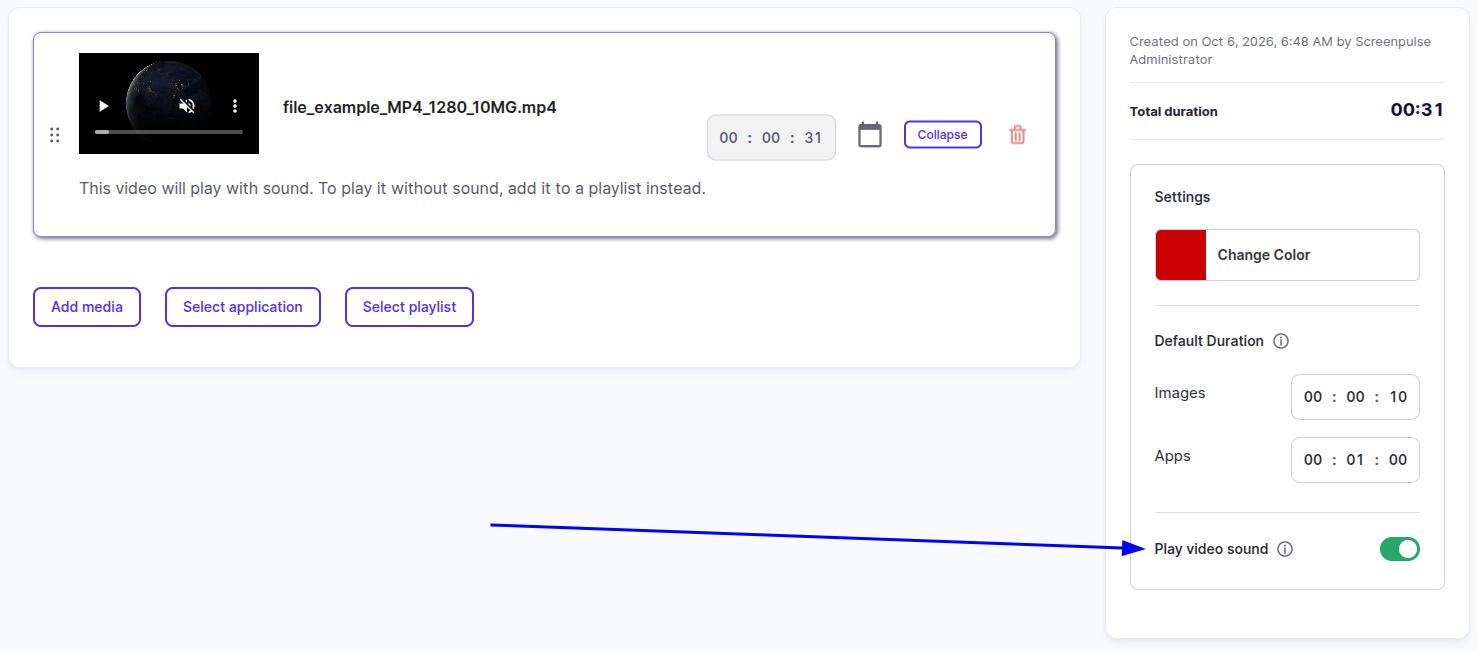
Videos inside a playlist play muted unless you turn on Play video sound in the playlist's Settings sidebar. A video put on a screen by itself, without a playlist, plays with sound.
Turn sound on for a playlist
- Go to Playlists and open the playlist.
- In the Settings sidebar, turn on Play video sound.
- Click Save & Publish.
The setting covers every video in that playlist; you can't set it per video.
Play a video silently on its own
Put it in a playlist, alone if you like, and leave Play video sound off. Assigning the video straight to a screen always plays it with sound.
No sound even with the setting on?
- Check the TV or device volume, and that the display's speakers or sound bar are on.
- The web player may stay muted. Browsers can block sound that starts by itself, and the player falls back to muted. The Screen Pulse apps for Android and Fire OS devices play sound normally.
Related articles
Still need help?
Our support team can walk you through it.