

Drafts vs. published: when changes go live
Why a playlist isn't showing on screen, and how to work on changes without disturbing what's playing.
Updated 1 min read
On this page
A playlist only plays on screens once it's published. When you edit a playlist you choose: Save & Publish sends your changes to every screen using it, while Save Draft saves them without touching what's playing. A draft playlist never plays on a screen, even if it's assigned to one.
How to tell them apart
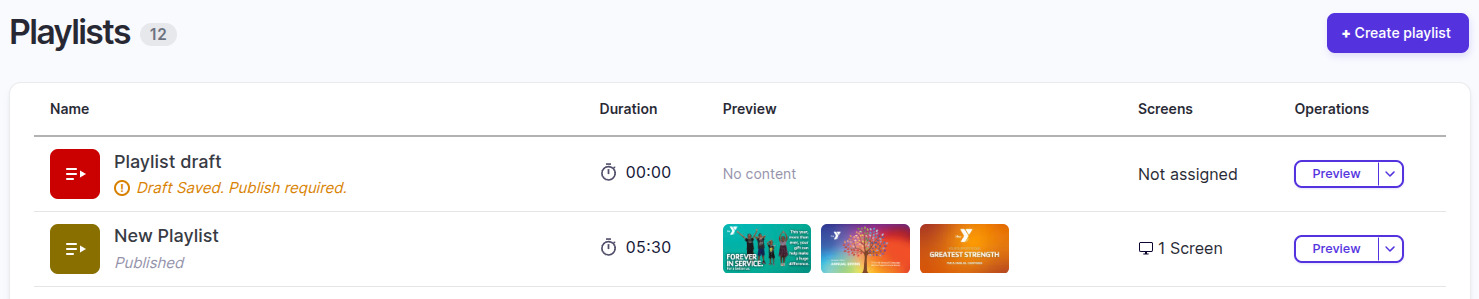
In the Playlists list:
- Published means the playlist is live on the screens it's assigned to.
- "Draft Saved. Publish required." means there are saved changes that aren't live yet.
Work on changes safely
Use Save Draft to build up changes over several sessions. The live version keeps playing until you click Save & Publish.
"I assigned a playlist and it isn't playing"
The playlist is probably a draft. You can assign a draft with Set to Screen, and the window warns you that it's a draft, but the screen keeps showing your default content until the playlist is published. Open it and click Save & Publish: the screen switches to it without assigning it again.
Good to know
- Publishing doesn't put a playlist on a screen. A published playlist that isn't assigned anywhere shows "Not assigned" in the Screens column. Use Set to Screen to assign it.
Related articles
Still need help?
Our support team can walk you through it.