

Screen statuses explained: Inactive, Live and Offline
What each status badge in the Screens list means, and what to do about it.
Updated 2 min read
On this page
Every screen in the Screens list shows one of three statuses. Inactive means no device is paired yet. Live means a device is paired and checking in. Offline means a device is paired but hasn't checked in recently, usually because of a power or network problem at the display.
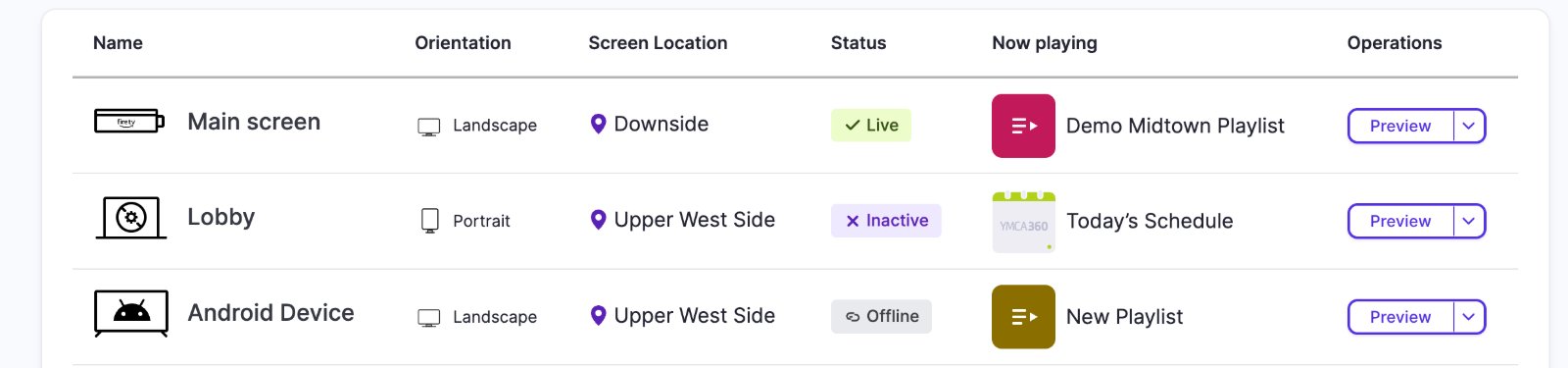
The three statuses
| Status | What it means | What to do |
|---|---|---|
| Inactive | The screen exists in Screen Pulse, but no device is paired to it. Nothing is showing it. | Pair a device. See Install the player and connect your first screen. |
| Live | A device is paired and checking in normally. It receives your content and changes. | Nothing. This is the healthy state. |
| Offline | A device is paired but has stopped checking in. It can't receive changes. | Check power and internet at the display. See My screen shows Offline. |
Hover over a badge to see a one-line explanation of that status.
How Screen Pulse decides
The paired device checks in with Screen Pulse at a regular interval. While check-ins keep arriving, the screen shows Live. When they stop, it switches to Offline. A short grace period means a brief network hiccup doesn't make a healthy screen flicker to Offline.
Offline doesn't mean blank
A device that loses its connection keeps playing the content it already downloaded, so the display can look perfectly normal while Screen Pulse shows Offline. Trust the badge over what you see on the screen: an offline device won't pick up anything you change until it's back online.
Once it reconnects, it catches up on its own.
Live, but showing "Subscription Not Active"
If your trial has ended or your plan is cancelled, every screen shows a Subscription Not Active notice instead of your content. The device is still connected, so the badge can stay Live. The screens play again once your plan is active; see My screens show "Subscription Not Active".
Inactive and Offline are different problems
- Inactive: you haven't paired a device yet, or you unpaired it. Fix it by pairing.
- Offline: a device is paired and has gone quiet. Fix the connection at the display.
Related articles
- My screen shows Offline Why a screen goes Offline, what to check at the display, and what to do when every screen is Offline at once.
- Install the player and connect your first screen Start the player on your device, pair it with a 6-character code and check that it is live.
- Check which device is connected to a screen Find the model, operating system, resolution, player version and network details of a screen's device.
Still need help?
Our support team can walk you through it.