

Show each location its own donors
Tag donors with your sites, then let each display show only the donors of the screen's location, or of the locations you pick.
Updated 3 min read
If your organization has several sites, each one can thank its own donors. You tag donors with the locations they support, and set a display's Locations to Inherit screen location. Every screen then shows the donors of the location the screen stands in, from the same display, plus the donors you haven't tagged, who are thanked everywhere.
This works in Classic, Spotlight, Listing, Donor Gratitude Wall, Sponsor Reel and Donor Wall set to Automatic list: the templates that list donors for you. In the handpicked templates you choose each donor yourself, so they have no Locations setting.
Set it up
- Add your locations in your organization settings, such as "Main Building" and "Aquatic Center". See Organization settings.
- Give each screen its location. In Screens, edit the screen and pick its Location. See Record where a screen is.
- Tag the donors. In Donor Recognition → Donors, open a donor and pick one or more Locations. You can also fill the Locations column when you import a spreadsheet. Leave a donor's locations empty to thank them at every location.
- Set the display. In My displays, edit the display and choose Locations: on Classic and Spotlight it's below Display donors alphabetically, on Listing, Donor Gratitude Wall and Donor Wall it's among the last settings on the Donors tab, and on Sponsor Reel it's on the Options tab. Click Save display.
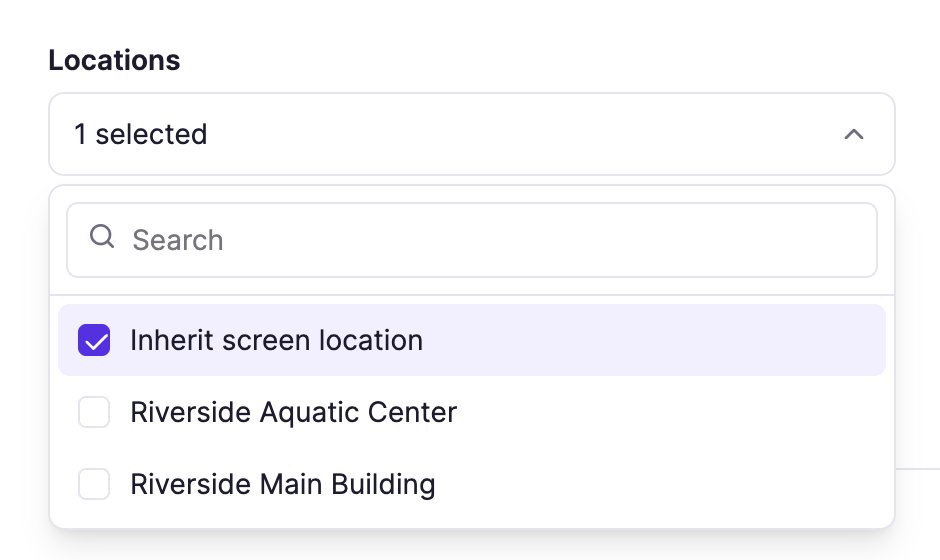
What each choice shows
| Locations | What a screen shows |
|---|---|
| Empty | Every donor, wherever the display plays. This is how every display starts. |
| Inherit screen location | The donors of the screen's own location, and donors with no location. One display serves every site. |
| One or more locations | The donors of those locations, and donors with no location, on every screen. |
| Inherit screen location and locations | The screen's location and the ones you picked, together. |
Donors with no location always show. Tagging is only needed for donors you want to keep to some of your sites.
A screen with no location shows every donor when the display is set to Inherit screen location alone. Give it a location to narrow its list.
The preview and changes
The preview shows every donor for Inherit screen location. It isn't on a screen yet, so there is no location to inherit. Locations you pick yourself do apply in the preview. To check what a site sees, open Preview from that screen in Screens.
A screen picks up a new location within about five minutes, the next time it asks for donors, without saving the display again. So does a donor you tag or untag.
A display with no donors for a site is skipped on that site's screens, as any display with no matching donors is, and keeps playing on the others. Turn this off in Donor Recognition settings with When no donors match. My displays marks such a display Won't play only when none of your screens' sites has donors for it.
Related articles
- Donor recognition: from donor list to screen How your donor list feeds your Donor Recognition displays, and how to add, edit and find donors.
- Organize screens into groups and locations Keep a long Screens list tidy with screen groups, and record where each screen is.
- Organization settings: name, logo, timezone and locations Set your organization's logo, default timezone, default play lengths and physical locations.
Still need help?
Our support team can walk you through it.